

Your specifications section is where confident buyers become actual buyers. For personalized products, incomplete specs are deal-breakers—customers need to know exactly what they can personalize, what the limitations are, and what happens if something goes wrong.
Earlier sections covered production timelines (4.1), material descriptions (4.5), and pricing transparency (4.4). This section focuses on the specifications unique to personalization: character limits, allowed characters, engraving dimensions, care instructions, and error policies.
Personalization Specifications
These are the specs customers need before they start customizing.
Character Limits with Context
Don't just say "15 characters max." Show what that means:
Good example:
"Up to 15 characters including spaces. Examples that fit: 'Emma & James', 'Est. 2023', 'Forever Yours'"
Even better:
"Up to 15 characters. Names like 'Sarah' or 'Alexander' appear full-size. Longer messages like 'Always in my heart' (18 characters) won't fit—try 'Always with me' instead."
Giving real examples prevents the frustration of customers crafting the perfect message only to find it's too long.
Engraving/Print Area Dimensions
Customers want to know how big their personalization will actually be:
"Engraving area: 25mm x 5mm (approximately 1 inch wide). Text appears ~2mm tall in our standard font."
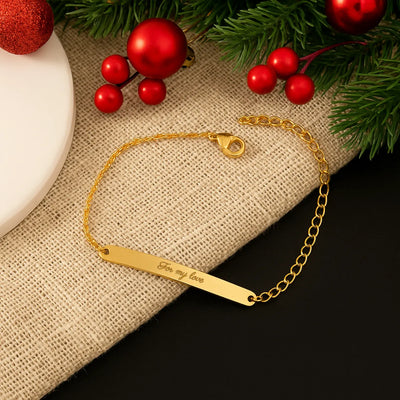
For visual learners, include a simple diagram or photo showing the engraving area on the product.
Font Options with Descriptions
Don't just show font names—explain when to use each:
Script: Elegant, flowing letters. Best for names and romantic messages. May be harder to read at very small sizes.
Block: Clean, bold, easy to read. Ideal for dates, initials, and short words.
Serif: Classic and timeless. Works well for formal occasions and longer text.
This guidance helps customers choose confidently instead of second-guessing.
Available Characters
Be explicit about what can and can't be engraved:
What's allowed:
"Letters A-Z, numbers 0-9, spaces, and basic punctuation (. , ' & - !)"
What's NOT allowed:
"Emojis, special symbols (♥ ★ ∞), and accented characters (é, ñ, ü) are not available for engraving. For symbols, see our 'Add Icon' option."
Discovering limitations during customization is frustrating. Discovering them after ordering is a support ticket.
Personalization Limitations
Be upfront about what you can't do. Honesty prevents disappointment.
Text That Doesn't Work Well
"Very long names (15+ characters) will appear smaller to fit. Script fonts may be difficult to read below 10 characters. ALL CAPS can look harsh in script fonts—we recommend sentence case."
Products With Restricted Areas
"Back of pendant cannot be engraved. Inside band engraving available on sizes 6-10 only (smaller sizes have insufficient surface area)."
Content Restrictions
"We reserve the right to decline personalization requests containing profanity, hate speech, or trademarked terms. If we can't fulfill your request, we'll contact you within 24 hours."
Care Instructions for Personalized Items
Personalized items often have different care requirements than standard products. Engraving creates texture that can trap dirt. Embossing affects leather differently than smooth surfaces.
Engraved Jewelry
"Clean gently with a soft cloth. Avoid abrasive cleaners that can dull the engraving. The engraved area may darken slightly over time, creating a beautiful antique effect—or polish to restore brightness."
Embossed Leather
"Embossing is permanent and water-resistant but not waterproof. If leather gets wet, let it dry naturally—never use heat. Apply leather conditioner around (not on) the embossed area to prevent cracking."
Printed Items
"Machine wash cold, inside out. Avoid bleach and high heat drying, which can fade the personalization. Print is rated for 50+ washes with proper care."
Care instructions specific to the personalization build confidence and reduce "will this last?" anxiety.
Error Policy: What If We Get It Wrong?
This is one of the most important specs for personalization stores—and most merchants bury it or don't mention it at all.
Make Your Guarantee Prominent
Our Promise: If we make an error in your personalization—wrong spelling, wrong font, wrong placement—we'll remake it free of charge and ship it priority at no cost to you.
Clarify Customer Responsibility
"Please double-check your personalization before submitting. We engrave exactly what you enter. Errors in your original submission (misspellings, wrong dates) are not covered under our free remake policy, but we offer 50% off a corrected replacement."
Mention the Proof Process
"You'll receive a digital proof within 24 hours showing exactly how your personalization will appear. Approve it, request changes, or cancel for a full refund—before we make anything."
This connects to section 4.3 (Personalization Interface) and reinforces the safety net.
General Specs Best Practices
These apply to all specifications, not just personalization-specific ones.
Add Units to Every Measurement
Transform vague numbers into clear specs:
- ❌ "Length: 18" → ✓ "Length: 18 inches (45.7 cm)"
- ❌ "Weight: 12" → ✓ "Weight: 12 grams (0.42 oz)"
- ❌ "Chain: 2mm" → ✓ "Chain: 2mm thick (delicate, lightweight)"
This small detail shows professionalism and prevents confusion.
Explain Technical Terms
Don't assume customers understand jewelry or leather terminology:
- ❌ "925 sterling silver" → ✓ "925 sterling silver (92.5% pure silver, hypoallergenic, tarnish-resistant)"
- ❌ "Full-grain leather" → ✓ "Full-grain leather (highest quality, develops patina over time)"
- ❌ "Lobster clasp" → ✓ "Lobster clasp (secure, easy to open with one hand)"
The explanation in parentheses adds value without cluttering the spec.
Scannable Specs Layout
Even great specifications don't help if customers can't find them.
Quick-View Panel Near Add to Cart
Put the most critical specs in a compact box near your buy button:
- Engraving: Up to 15 characters
- Fonts: 5 styles available
- Production: 3-5 business days
- Ships: Free over $50
This answers key questions without scrolling.
2. Product specs with units (size, material)
3. Timeline specs (production, shipping)
4. Link to full details for those who want more
Collapsible Sections for Details
Organize detailed specs into expandable sections:
- Personalization Options (character limits, fonts, icons)
- Materials & Dimensions (size, weight, materials)
- Care Instructions (cleaning, storage, longevity)
- Shipping & Policies (production time, returns, guarantees)
Customers who want details can find them. Customers who don't aren't overwhelmed.
Mobile Considerations
On mobile, collapsible sections are essential—long spec lists push your add-to-cart button off screen. Test that your specs are readable without horizontal scrolling.
Common Mistakes
Vague character limits "Short messages only" means nothing. Give specific numbers with examples.
Missing "what's not allowed" Customers assume they can add emojis or symbols, then get frustrated when they can't.
No error policy visible Customers worry about mistakes. A clear guarantee reduces purchase anxiety.
Generic care instructions "Clean with soft cloth" doesn't address how to care for the engraving specifically.
Specs buried below reviews Critical information should be accessible without excessive scrolling.
Quick Checklist
Personalization Specs:
- [ ] Character limits with real examples
- [ ] Engraving/print area dimensions
- [ ] Font options with guidance on when to use each
- [ ] Allowed characters listed explicitly
- [ ] Restrictions clearly stated (no emojis, no accents, etc.)
Policies:
- [ ] Error/remake policy prominent and clear
- [ ] Customer responsibility for typos explained
- [ ] Proof approval process mentioned
Care Instructions:
- [ ] Care specific to personalization type (engraving, embossing, print)
- [ ] Longevity expectations set
Layout:
- [ ] Quick-view panel near add-to-cart
- [ ] Detailed specs in collapsible sections
- [ ] Mobile-friendly formatting
- [ ] Units included on all measurements
- [ ] Technical terms explained in parentheses
Key Takeaways
Personalization specs go beyond standard product details. Customers need to know character limits (with examples), what characters are allowed, and what the engraving area looks like.
Be upfront about limitations. Discovering you can't use emojis or accented characters after ordering creates frustration and support tickets.
Include care instructions specific to personalization. Engraved jewelry and embossed leather have different care needs than standard products.
Make your error policy prominent. "If we make a mistake, we fix it free" is a powerful trust signal that reduces purchase anxiety.
Use scannable layouts. Quick-view panels near the buy button, collapsible sections for details, and mobile-friendly formatting help customers find the specs they need.
Next up: Trust signals and guarantees for personalized products.

